Cyber Essentials · Guide · Requirements
Cyber Essentialsrequirements: the fivecontrols in 2026
What each of the five Cyber Essentials controls asks for under Requirements for IT Infrastructure v3.3, what has to be in scope, and which requirements now fail an assessment on their own. Use it as a checklist before you open the question set.
v3.3, from 27 April 2026Five controlsTwo automatic failsReadiness checklist
Firewalls, secure configuration, user access control, malware protection and security update management, applied to everything in scope.
The requirements are short and practical, which is their strength: they target the commodity attacks behind most incidents. They are also strict. Every device, server and cloud service in scope has to meet every requirement on the day the certificate is issued, and two areas, multi-factor authentication on cloud services and timely updates, now fail an assessment on their own.
- Document
- Requirements for IT Infrastructure v3.3
- Applies to
- Assessment accounts created from 27 April 2026
- Automatic fails
- Cloud MFA; updates within 14 days
- In scope
- Devices, servers, network kit and cloud services handling your data
The controls
The five Cyber Essentials controls
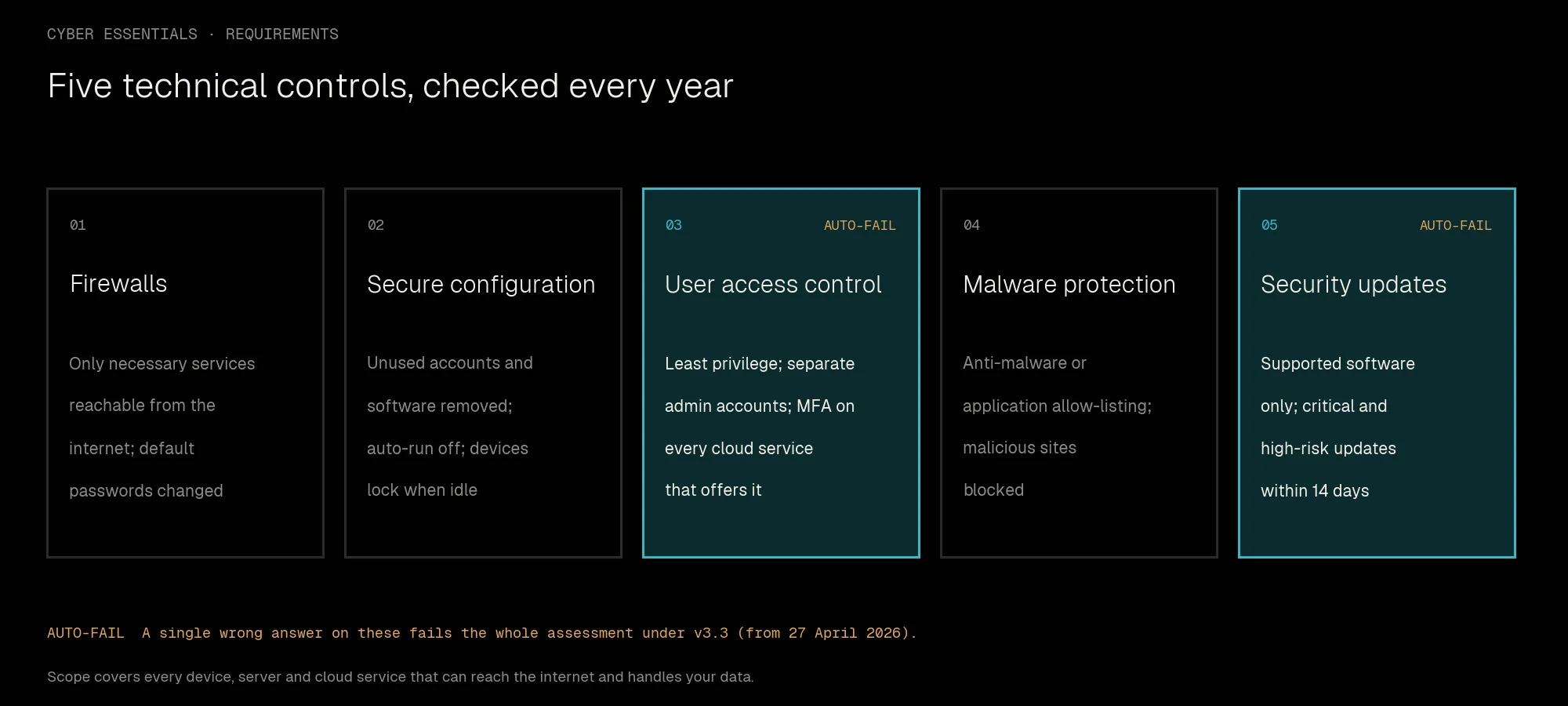
Each control is described below in the order the question set asks about it. Where a requirement allows a choice, such as anti-malware software or application allow-listing, either option satisfies it.
In detail
What each control requires
Firewalls
Every device in scope sits behind a correctly configured firewall: a boundary firewall or router at the edge of the office network, and a software firewall on devices used on networks you do not control, such as home broadband or public Wi-Fi. Default administrator passwords must be changed. The administrative interface must not be reachable from the internet unless it is protected by multi-factor authentication or limited to known addresses. Inbound rules must be approved, documented and removed when no longer needed.
Secure configuration
Remove or disable unused accounts and software. Change default passwords. Turn off auto-run, so that inserted media and downloaded files cannot launch code by themselves. Devices must require a password, PIN or biometric to unlock, and passwords must be protected against guessing by locking out or throttling repeated attempts.
User access control
Accounts are created through an approval process and removed when someone leaves. Each person has their own account. Administrator rights sit on separate accounts used only for administration. Passwords must be protected by multi-factor authentication, or be at least twelve characters long, or at least eight characters with common passwords blocked automatically. Multi-factor authentication must be turned on for every cloud service that offers it, whether the option is free, included or paid for; since April 2026 missing it is an automatic fail. Passwordless methods such as passkeys are recognised in v3.3. Our MFA guide covers the methods and the rollout.
Malware protection
Each device runs anti-malware software, kept up to date, that scans files when they are opened and blocks connections to known malicious websites; or uses application allow-listing so that only approved, signed software can run. Our guide explains what malware is and how it arrives.
Security update management
All software in scope must be licensed and supported by its vendor; anything that no longer receives security updates must be removed or taken out of scope. Automatic updates should be on where possible. Critical and high-risk updates, including those scored CVSS v3 7 or above, must be installed within fourteen days of release. Since April 2026 the two questions that ask this, for operating systems and firmware and for applications, are automatic fails.
Scope
What has to be in scope
Scope covers every device, server and service that can connect to the internet and handles your organisation's data or services. In practice that means:
| In scope | Notes |
|---|---|
| Laptops, desktops and thin clients | Including those used at home |
| Servers, physical and virtual | Including cloud servers you manage |
| Phones and tablets | Including personal devices that access work email or data; devices used only for calls, texts or an authenticator app are excluded |
| Firewalls and routers | Including home routers supplied by the organisation |
| Cloud services | Every service holding your data or running your services; these cannot be excluded |
| Publicly available commercial web applications | In scope by default; bespoke and custom components are not |
Since April 2026, anything excluded must be described and justified, and you must explain how excluded networks are separated. Every legal entity in scope must be named with its address and company number.
Checklist
A ten-point readiness checklist
If every card here is true of your estate, you are close to ready. If not, the gaps are your to-do list.
Inventory complete
Every device, operating system and version, and every cloud service, listed and owned by someone.
Nothing unsupported
No operating system, browser or application in scope that has stopped receiving security updates.
Fourteen-day patching
Critical and high-risk updates installed within fourteen days, with evidence such as a patch report.
MFA on every cloud service
For every user and administrator, on every service that offers it, including the ones bought on a company card.
Separate admin accounts
Administrator rights only on dedicated accounts, used only for administration.
Leavers removed
Accounts for people who have left disabled, and unused accounts removed.
Default passwords changed
On routers, firewalls, printers and any device or service that shipped with one.
Auto-run off
Removable media and downloads cannot launch code without the user's say-so.
Malware protection on
Anti-malware up to date, scanning on access and blocking malicious sites; or allow-listing in force.
Firewall rules reviewed
Default admin password changed, no internet-facing admin page without MFA, unused inbound rules removed.
Cyber Essentials guides
Everything on Cyber Essentials
Each page covers one part of the scheme. Start wherever your question is.
Cyber Essentials certification
Our service: a readiness check, the assessment and the Plus audit, from £295 + VAT.
How to get Cyber Essentials certification
The route from first call to certificate, what you need to hand and the free help available.
The Cyber Essentials process
Each stage of the self-assessment explained: scope, questions, marking and the certificate.
The Cyber Essentials Plus process
The audit in detail: the sample, the five tests, the 90-day window and what happens if a test fails.
Cyber Essentials vs Cyber Essentials Plus
How the two certificates differ, who asks for which, and how to decide.
Cyber Essentials cost
What the assessment and the Plus audit cost, and the one cost most people do not expect.
Contact
Ask for a readiness check against v3.3
Tell us roughly how many people and devices you have, which cloud services you use and when you need the certificate. We reply within one working day with a fixed price.
Questions
Questions about the Cyber Essentials requirements
What are the Cyber Essentials requirements?
Five technical controls set out in the NCSC's Requirements for IT Infrastructure: firewalls, secure configuration, user access control, malware protection and security update management. Version 3.3 applies to assessment accounts created from 27 April 2026.
Is MFA a Cyber Essentials requirement?
Yes. Multi-factor authentication must be turned on for every cloud service that offers it, for users and administrators. Missing it is an automatic fail under v3.3.
What counts as unsupported software?
Any operating system, application, browser or firmware that its vendor no longer provides security updates for. It must be removed, replaced or taken out of scope with proper separation.
Are personal devices in scope?
Yes, if they access organisational data or services, such as work email. Devices used only for voice calls, text messages or an authenticator app are excluded.
Can we exclude our cloud services?
No. Since April 2026, cloud services that host your data or run your services cannot be excluded from scope.
Are the requirements different for Cyber Essentials Plus?
No. Plus tests the same requirements on a sample of devices and every cloud service. Our guide to the Plus process explains the tests.
Start a conversation
Most organisations pass first time when they check first.
A thirty-minute call is enough to scope the work and give you a fixed price in writing.