The phishing page that let Microsoft do the reconnaissance
I spent a few minutes yesterday poking at a phishing page that behaved exactly like the real Microsoft 365 sign-in, because it was the real Microsoft 365 sign-in, relayed through the attacker's server. What made it worth writing about was not the theft of credentials but the quiet way it used Microsoft's own sign-in endpoints to work out, before a password was ever typed, whether it had caught a real account at the right company.
Most of the phishing I am shown is, frankly, dull. A misspelt sender, a login page with the wrong shade of blue, a domain that gives the game away if you glance at it. It is the kind of thing our awareness training is built to catch, and it mostly does. So when a client passed me a link yesterday that had reached one of their staff, I opened it expecting the usual. What I found instead was a good deal more careful than usual, and careful in a way that is worth understanding, because it tells you something about where credential theft has quietly moved to and why multi-factor authentication, on its own, is no longer the finish line we once treated it as.
I want to describe what I saw plainly, and then explain how it works, because the interesting part is not a clever trick the attacker invented. The interesting part is that the attacker invented almost nothing. They borrowed Microsoft's own machinery, and Microsoft, doing exactly what it is designed to do, told them which of their targets were worth pursuing.
A note before I go on: the screenshots below have been anonymised. The client's domain has been replaced with client-domain.com, the account names are invented, and the attacker's domain is shown defanged. Nothing here identifies the organisation that received the email.
What I actually saw
The email did the ordinary thing: it asked the recipient to click a link to review a document. The link did not go straight to a fake login. It went first to a page asking me to prove I was human.
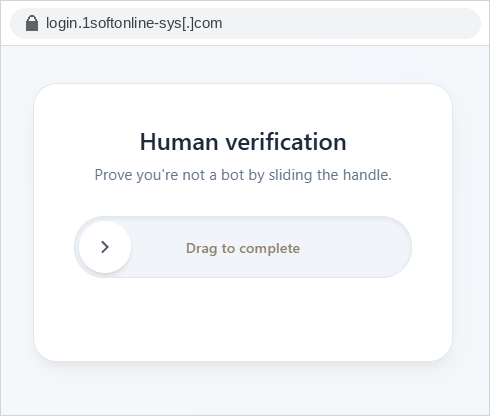
This is a Cloudflare Turnstile-style verification gate, the same slide-to-complete widget you have met on countless legitimate sites. Only after clearing it was I passed to the next page, which was a Microsoft sign-in prompt.
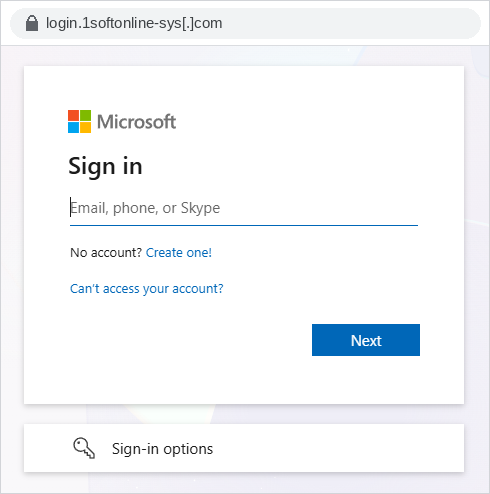
There is nothing to criticise in the rendering, because there is nothing rendered. This is not a copy of the Microsoft sign-in page. It is the Microsoft sign-in page, served to my browser through the attacker's server. I will come back to why that distinction matters more than anything else here.
The next part is what made me stop and pay attention. I did what any curious defender does and started typing rubbish into the username field to see how the page reacted. I entered a made-up account on a domain that has nothing to do with the client. The page told me, in Microsoft's own words:
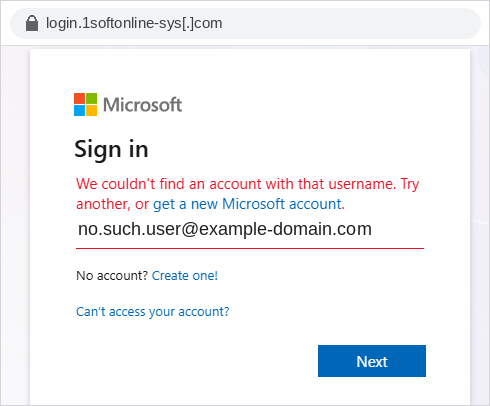
"We couldn't find an account with that username. Try another, or get a new Microsoft account."
Then I changed only the domain, swapping in the client's real domain but keeping the same nonsense account name. The message changed:
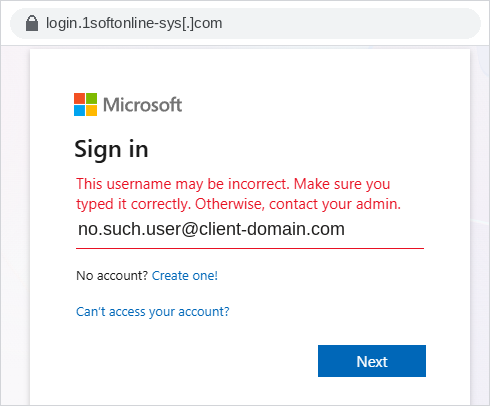
"This username may be incorrect. Make sure you typed it correctly. Otherwise, contact your admin."
Finally I entered a genuine account belonging to the client. No error at all. The page moved me straight on to the password step.
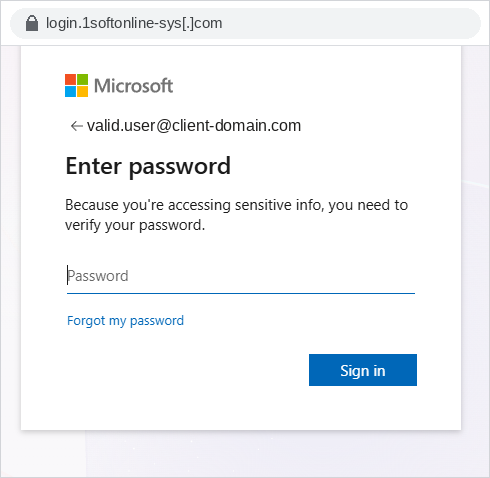
Three different inputs, three different outcomes, and between them a complete map. The page had just confirmed, without my supplying a single password, which domains belong to a Microsoft tenant and which specific accounts exist inside one. On a phishing page. That is the bit worth writing about.
Why the page behaved exactly like Microsoft
The technique underneath all of this is called adversary-in-the-middle, usually shortened to AiTM, and it is the defining feature of the phishing kits that have taken over this space over the last two years. Kits sold as a service under names such as Tycoon 2FA, Mamba 2FA and their many cousins all work on the same principle, and what I looked at yesterday is consistent with that family.
An old-fashioned phishing page is a static forgery. Someone copies the HTML of a login page, hosts it somewhere, and collects whatever you type. It never talks to the real service, which is why it cannot get past multi-factor authentication and why the details are so often slightly wrong.
An adversary-in-the-middle page is not a forgery at all. It is a reverse proxy. The attacker's server sits directly between you and the genuine Microsoft login, passing your requests onward to Microsoft and passing Microsoft's responses back to you. You are, in every meaningful sense, using the real thing, with a thief reading over your shoulder. Because the traffic is genuine, the page looks perfect, behaves perfectly, and, crucially, produces every genuine response Microsoft would produce, including the error messages I triggered above. The attacker did not have to program those messages. They simply relayed them.
The reason attackers went to this trouble is multi-factor authentication. When you enter your password on the proxied page, the attacker's server forwards it to Microsoft in real time, which triggers a genuine MFA challenge, which you dutifully complete. Microsoft, satisfied, issues a session cookie, the small token your browser holds that says "this person has already signed in, do not ask again". The proxy captures that cookie on its way through. From that point the attacker can import the cookie into their own browser and is signed in as you, having never known and no longer needing your password or your second factor. Microsoft's own analysis of the Tycoon 2FA kit describes exactly this: credentials relayed to the real service, the genuine MFA challenge triggered, and the resulting session cookie intercepted so that access survives even a later password change. MFA was not broken. It was simply completed by the victim, on the real site, and then stepped around.
The human-verification gate is not there for your benefit
It is tempting to read that first Turnstile page as a bit of misdirection to make the site feel trustworthy, and it does do that. But its main job is defensive, and the defence is the attacker's, not yours.
Security teams and email providers defend against phishing partly by sending automated crawlers and sandboxes to visit suspicious links and analyse what is there. A verification gate stops most of them at the door. Automated scanners generally cannot, or will not, solve an interactive challenge, so they see only the gate and never the phishing content behind it, which makes the page far harder to detect and take down. The same gate also quietly filters out the merely curious, the researchers and the scripts, so that the attacker's server spends its effort on real people who arrived from real emails. Kits in this family layer several such controls together, filtering by geography and by network so that traffic from data centres and security vendors is turned away while a genuine target on a corporate connection is waved through. The friendly "prove you're not a bot" is doing precisely the opposite of what it claims: it is there to keep the bots that protect you out.
The open Microsoft functions being used
Now to the part the client actually asked me about, which is how a phishing page came to be such an accurate account-checking tool, and what "weakness" it is leaning on.
The short answer is that it is leaning on two endpoints that Microsoft exposes to anyone, with no authentication at all, because the sign-in experience needs them. Neither is a secret and neither is a bug in the ordinary sense. They are documented behaviours that the security testing community has used for years, and because the AiTM page is the real Microsoft sign-in, it exercises them as a matter of course.
The first answers the question is this domain a Microsoft tenant, and how does it authenticate? When you begin to sign in, Microsoft has to work out where to send you, a step it calls home-realm discovery. It does this through a public endpoint, getuserrealm.srf, which anyone can call for any domain and which returns a field called NameSpaceType:
| NameSpaceType | What it tells you |
|---|---|
| Managed | The domain is a valid Microsoft 365 / Entra ID tenant that authenticates in Microsoft's cloud |
| Federated | The domain is a valid tenant, but authentication is delegated to an external provider, whose sign-in URL is helpfully returned as well |
| Unknown | The domain is not associated with any Microsoft tenant |
The second answers the finer question does this specific account exist? The sign-in page calls an endpoint named GetCredentialType, again without authentication, and reads a field called IfExistsResult:
| IfExistsResult | Meaning |
|---|---|
| 0 | The account exists and authenticates against this domain |
| 1 | The account does not exist |
| 5 or 6 | The account exists but authenticates via a different (federated) identity provider |
| 2 | The request is being throttled |
Put those two together and the three outcomes I saw earlier stop being a curiosity and become simple logic. When I entered an account on a domain that Microsoft does not recognise as a tenant, the sign-in flow fell back to checking for a personal Microsoft account, found none, and offered to let me create one, which is the origin of that first message and its telltale "get a new Microsoft account". When I kept the same fictional account but moved it onto the client's real domain, Microsoft recognised the tenant, looked for the account, did not find it, and returned the organisational message that only makes sense for a managed tenant, the one that tells you to "contact your admin". When I entered a real account on the real tenant, everything checked out and I was moved to the password step. The page never needed to guess. Microsoft told it the answer each time.
It is worth being precise about one thing, because it goes to the point. An attacker running one of these kits does not even have to type usernames in by hand as I did. Because these endpoints are open and scriptable, a target list can be validated in bulk before a single email is sent, so that the campaign is aimed only at addresses known to exist at the target organisation. The very same endpoints let the phishing page, once a victim arrives, confirm in real time that it has caught a live account at the right company rather than a researcher or a mistyped address, and proceed only when it has. The enumeration and the theft are the same machinery used twice.
Why this is a design tension rather than a bug to report
The natural instinct, on discovering that a public endpoint will confirm whether your staff's accounts exist, is to want it turned off. It cannot really be, and it is worth understanding why, because it changes what you do about it.
Home-realm discovery exists so that the sign-in page can send a user to the right place: straight to a password, or onward to a federated provider, or to account creation. To do that it must be willing to say, to an unauthenticated caller, whether a domain and an account are known. Microsoft has long treated this as an inherent property of the sign-in experience rather than a defect to be fixed, which is why these endpoints have behaved this way for years and why the tooling that exercises them is mature and widely available. You should assume, as a baseline, that the existence of any account at your organisation is discoverable by anyone who cares to look. That is an uncomfortable assumption, but it is a truthful one, and it points you at the right defences rather than a fruitless one.
What this means for defenders, and the good version of the story
I promised myself years ago that I would stop selling security with fear, so let me describe the position this leaves you in as an opportunity rather than a threat, because it genuinely is one.
The whole elaborate chain I have described exists to do one thing: steal a valid session so that an attacker can act as your user. Every defence that matters here works by making that stolen session worth less. If you accept that account enumeration cannot be prevented and that a convincing AiTM page cannot always be spotted by a busy person, then the game becomes limiting the value of what is taken, and that is a game you can win.
The single most effective move is to make the credential worth stealing something the proxy cannot replay. Phishing-resistant authentication, meaning passkeys, FIDO2 security keys or Windows Hello for Business, binds the sign-in cryptographically to the genuine Microsoft domain, so a login attempted through an attacker's proxy simply does not complete. This is the one control that breaks the AiTM model rather than merely raising its cost, and for the accounts that matter most it is where I would spend first. Alongside it, Conditional Access earns its keep: requiring a compliant, managed device to reach your data means that even a captured session, replayed from the attacker's own machine, arrives from an unrecognised device and is refused. Token protection and shorter session lifetimes narrow the window further, so that a cookie taken today is not still a master key next week.
Then there is seeing it happen. A stolen session announces itself if you are watching for the right things: a sign-in from a location or network the user has never touched, arriving minutes after a legitimate one from somewhere else; a new mail-forwarding rule created quietly after access; a session that appears from a hosting provider's address range rather than a home or office. None of these is exotic, and all of them are exactly what a managed detection capability is for. Our own managed SOC treats this class of AiTM sign-in as a priority pattern precisely because the initial theft is so hard to prevent that the response has to be fast.
And do not write off your people, but do change what you ask of them. "Spot the fake login" is a losing instruction when the login is real. "Tell us the moment something feels off, and never be told off for a false alarm" is a winning one, because the earlier a compromised session is reported, the sooner it can be revoked, and a session that is killed within the hour is a story about a good response rather than a breach.
Picture the morning this actually pays off. A member of staff clicks something they should not have, realises a beat too late, and tells you. You look, you see the unfamiliar session, you revoke it and reset the account before anything is done with it, and you close the ticket by lunch. The attacker did everything right, borrowed Microsoft's own tools, cleared every gate, and still left with a session that was dead before it was useful. That is an entirely achievable morning, and it is built not on catching the perfect fake but on assuming it will get through and arranging matters so that it does not matter much when it does.
Frequently asked questions
Is this a vulnerability in Microsoft 365 that Microsoft should fix? Not in the usual sense. The username-checking behaviour comes from public endpoints that the sign-in experience relies on for home-realm discovery, and Microsoft has long regarded this as inherent to how signing in works rather than a defect. The credential theft comes from adversary-in-the-middle proxying, which abuses the genuine service rather than exploiting a flaw in it. The practical conclusion is to assume account enumeration is always possible and to defend the session, not the secret.
Does multi-factor authentication stop this attack? Traditional multi-factor authentication does not, because the victim completes the genuine MFA challenge on the real Microsoft page and the attacker steals the resulting session afterwards. This is why phishing-resistant methods matter: passkeys, FIDO2 security keys and Windows Hello for Business bind authentication to the real Microsoft domain, so the sign-in cannot be completed through an attacker's proxy in the first place.
How can attackers tell which of our accounts are real before sending anything? Two unauthenticated Microsoft endpoints make it straightforward. One confirms whether a domain is a Microsoft tenant and how it authenticates; the other confirms whether a specific account exists within it. Both can be queried in bulk, which lets an attacker validate a target list in advance and aim a campaign only at addresses known to exist.
Why did the phishing page make me pass a "prove you're not a bot" check? Mainly to keep automated defences out. Security scanners and email sandboxes that visit suspicious links generally cannot solve an interactive challenge, so the gate hides the phishing content from the tools that would otherwise detect and take it down, while also filtering out researchers and scripts so the attacker's server deals only with real targets.
What are the most useful things to do this quarter? Roll out phishing-resistant authentication to your highest-value accounts first; require compliant, managed devices through Conditional Access so a stolen session cannot be replayed from elsewhere; shorten session lifetimes and enable token protection; make sure someone is watching sign-in logs for impossible-travel and unusual-network patterns; and give staff a fast, blame-free way to report a mistake so a compromised session can be revoked quickly.
Written by
Founder and Head of Threat Disruption
Founder of UK Cyber Defence. Former Global CISO for a FTSE 100 gaming company and for Microsoft Europe; founded Hedgehog Security in 2009.
Next step
Want this looked at in your own estate?
Thirty minutes with an analyst, not a salesperson. We will tell you whether it matters to you and what to do first.
Related insights
How to Stop Domain Impersonation Before It Hurts Your Business
Domain impersonation is a cyberattack where criminals create a domain name that looks almost identical to your legitimate business domain. For example, if your domain iscyberdefence.com, an attacker might registercyberdefenee.comorcyber-defence.com.
What Is Whale Phishing? Understanding Whaling Attacks
Learn what whale phishing is, how whaling differs from phishing and how to prevent costly executive-targeted cyberattacks.
Iranian state spyware ‘CHOSEN BRICK’: what it does and what to do
The NCSC, FBI and AIVD have exposed Iranian spyware — CHOSEN BRICK — used to surveil dissidents, activists and journalists. What the campaign does, who is really at risk, and the practical steps that protect the people targeted and the organisations around them.